
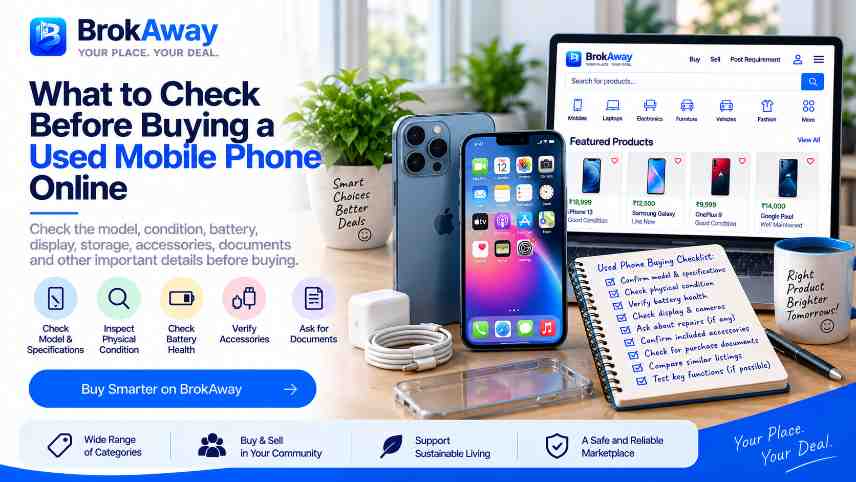
How to Verify a Used Mobile Phone Before Buying Online
Learn how to verify a used mobile phone online by checking its model, IMEI, battery health, display, cameras, storage, software, repairs, accessories, and other important phone details.
Buying a used mobile phone online can be a practical option when you want a particular model without purchasing a brand-new device. However, phones contain many components that are important to check before making a decision.
A phone may look good in photographs but still have battery, display, camera, software, network, or repair-related issues. That is why checking the actual phone details is more useful than judging a listing only by its appearance.
This guide explains the main things to verify when considering a used mobile phone online.
Check the Exact Mobile Phone Model
Start by confirming the exact phone being offered.
Check:
- Brand - Model name - Model number - Storage capacity - RAM - Variant - Colour - Network compatibility
Different variants of the same phone can have different specifications and prices.
Ask the seller to provide the exact model information if it is not clearly mentioned in the listing.
Verify the IMEI Information
The IMEI is an important device identifier for mobile phones.
Before buying, verify the IMEI information where appropriate and make sure the details provided by the seller are consistent with the actual device.
If the phone has more than one IMEI because of multiple SIM support, check the relevant information for the device.
Buyers should independently verify ownership and device-related information before completing a transaction.
Check the Battery Condition
Battery condition is particularly important for used phones.
Ask about:
- Battery health where the device provides this information - Battery backup - Charging performance - Previous battery replacement - Unusual heating - Fast battery drain
A phone with an older battery may work normally but provide a different experience from a newer device.
Check the Display and Touchscreen
The display is one of the most frequently used parts of a smartphone.
Check for:
- Cracks - Scratches - Dead pixels - Discolouration - Brightness problems - Touchscreen issues - Screen burn or image retention where relevant
If possible, test the touchscreen across different areas of the display.
Check the Cameras
Test all available cameras before buying a used phone.
Depending on the model, check:
- Main camera - Front camera - Ultra-wide camera - Telephoto camera - Flash - Video recording - Autofocus
Look for unusual spots, focus problems, blurry images, or other issues.
Check the Speakers and Microphone
Audio components can also show signs of wear.
Test:
- Earpiece - Main speaker - Microphone - Ringtone - Media playback - Voice recording
If possible, make a test call or use a recording application to check the microphone.
Check Charging and Connectivity
Test the charging port and relevant connectivity features.
Depending on the phone, check:
- Charging - USB connection - Wi-Fi - Bluetooth - Mobile network - GPS - NFC where applicable - SIM functionality
A damaged charging port or connectivity problem may not be obvious from photographs.
Check Storage and Performance
The phone should match your intended use.
Check the available storage and other specifications.
Also consider whether the phone's processor, RAM, operating system, and available storage are suitable for the applications and tasks you expect to use.
An older phone may still work well for basic tasks but may not be suitable for demanding applications.
Check the Software and Updates
Find out which operating system version the phone is currently running.
Also check whether the model continues to receive software or security updates from the manufacturer.
Software support can be an important consideration when buying an older smartphone.
Check for Previous Repairs
Ask whether the phone has ever been repaired.
Important questions include:
- Has the display been replaced? - Has the battery been replaced? - Has the charging port been repaired? - Have internal components been replaced? - Was the phone opened by a repair centre?
Replacement parts can affect the phone's current condition and should be considered when evaluating the listing.
Look for Physical Damage
Inspect the phone for visible signs of use.
Check:
- Back panel - Frame - Camera lenses - Screen - Buttons - Charging port - SIM tray
Small cosmetic marks may simply indicate normal use, while cracks, bent frames, or other major damage may require closer attention.
Check for Water or Liquid Damage
If possible, ask whether the phone has ever been exposed to water or liquid.
Liquid-related problems can sometimes appear later and may not be obvious from photographs.
For a used phone, it is useful to ask the seller directly about any known exposure or related repairs.
Check the Accessories
Find out what comes with the phone.
The listing may include:
- Charger - USB cable - Original box - Case - Screen protector - Earphones where applicable - Other accessories
Knowing what is included helps you understand the complete listing and compare it with other options.
Check Purchase and Warranty Information
If available, ask whether the seller has the original purchase bill or other supporting information.
Also check whether any manufacturer or seller warranty remains.
If a warranty is mentioned, independently verify its terms and whether it can be used by a subsequent owner.
Check Account and Device Locks
Before completing a purchase, make sure the phone can be properly reset and set up for the new user.
The previous owner's accounts should be removed from the device where applicable.
A phone that remains linked to another person's account may create problems during setup.
Do not rely only on the seller's statement. Verify the device status yourself before completing the transaction.
Compare the Phone With Similar Listings
After checking the phone's specifications and condition, compare it with similar listings.
Look at:
- Same model - Same storage - Similar age - Similar condition - Battery condition - Included accessories - Repair history - Location - Asking price
This provides better context than comparing the phone with a completely different model.
Consider the Phone's Age
Smartphone models change frequently.
An older phone may have a lower asking price but could also have:
- Older hardware - Shorter remaining software support - Older battery - Limited compatibility with newer features
Consider how long you expect to use the phone before deciding whether the model is suitable for you.
Ask the Seller Direct Questions
If the listing does not provide enough information, ask specific questions.
For example:
- When was the phone purchased? - How long has it been used? - Is the battery original? - Has the screen ever been replaced? - Has the phone been repaired? - Are all cameras working? - Does the charging port work properly? - Is the original bill available? - Are all accounts removed? - What accessories are included?
Clear answers can help you understand the actual condition of the phone.
Do Not Judge the Phone Only From Photos
Photos can help you understand the phone's appearance, but they cannot confirm every technical detail.
For an expensive used phone, consider inspecting the device and testing important functions before completing a transaction.
If physical inspection is not possible, ask the seller for additional information and photographs of relevant areas.
Used Mobile Phones on BrokAway
BrokAway is an online marketplace where users can discover new and second-hand products across different categories.
Users can explore mobile phones and other electronics, compare available listing information, and contact sellers when they need additional details.
Sellers can also list phones they no longer need and provide information about the model, condition, specifications, accessories, and asking price.
What If You Cannot Find the Phone You Want?
Sometimes the exact model, storage variant, or price range you are looking for may not be available in current listings.
In that situation, you can post a requirement on BrokAway.
You can mention:
- Preferred brand - Model - Storage - Budget - Condition preference - Location - Other requirements
This gives you another way to communicate what type of phone you are looking for.
Used Mobile Phone Verification Checklist
Before buying a used mobile phone, check:
- Exact model - Model number - Storage - RAM - IMEI information - Battery condition - Display - Touchscreen - Cameras - Speakers - Microphone - Charging port - Network and SIM - Wi-Fi and Bluetooth - Software version - Update support - Repair history - Physical condition - Liquid exposure - Accessories - Purchase information - Warranty information - Account status - Asking price
Final Thoughts
A used mobile phone should be evaluated as a complete device rather than simply by its brand or asking price.
Checking the model, IMEI information, battery, display, cameras, connectivity, software, repair history, accessories, and account status can give you a clearer understanding of the phone before making a decision.
For higher-value phones, independent verification and physical inspection can be particularly useful.
BrokAway provides a marketplace where users can discover new and second-hand mobiles and electronics, compare available listings, and post requirements when they cannot find the product they need.
BrokAway — YOUR PLACE. YOUR DEAL.
Disclaimer: Brokaway is a marketplace platform that connects users to discover products and services. Brokaway does not guarantee the quality, authenticity, availability, pricing, or completion of any transaction. Users should independently verify all relevant details before making any transaction.